Slack is for conversation. The Issue and Escalation Tracker is for accountability. This board ensures that important issues and escalations are visible, tracked, and resolved without getting lost in channel noise. Any issue that requires follow up, client action, or a decision must be logged.
What qualifies as an issue?
Log an issue when at least one of the following is true:
- You need an answer or action from the client leadership team
- The issue cannot be resolved immediately
- The issue impacts a guest experience, revenue, or operations
- The issue could affect a review or star rating
If it matters, it belongs in the tracker.
How to log an issue
- Go to the Slack channel #into-[client name]-client
- Go to the "Escalation Tracker" (second tab)
- Select Log Issue or the plus icon in the bottom-right
- Complete the form clearly and accurately. Make sure you add the link to the Guesty Inbox.
- Add the booking number followed by a few words to explain the issue (i.e. BOK987: Guest locked out)
- Status: Change to Pending Client Update
- Set Agent in Charge to yourself or whoever is on shift responsible for this ticket. If there is a shift change, Agent in Charge needs to be updated.
- Add the Inbox Link to make it easy to jump to the conversation in Guesty
- Either add a description of the issue or attach a message
- Tag the client team in comments
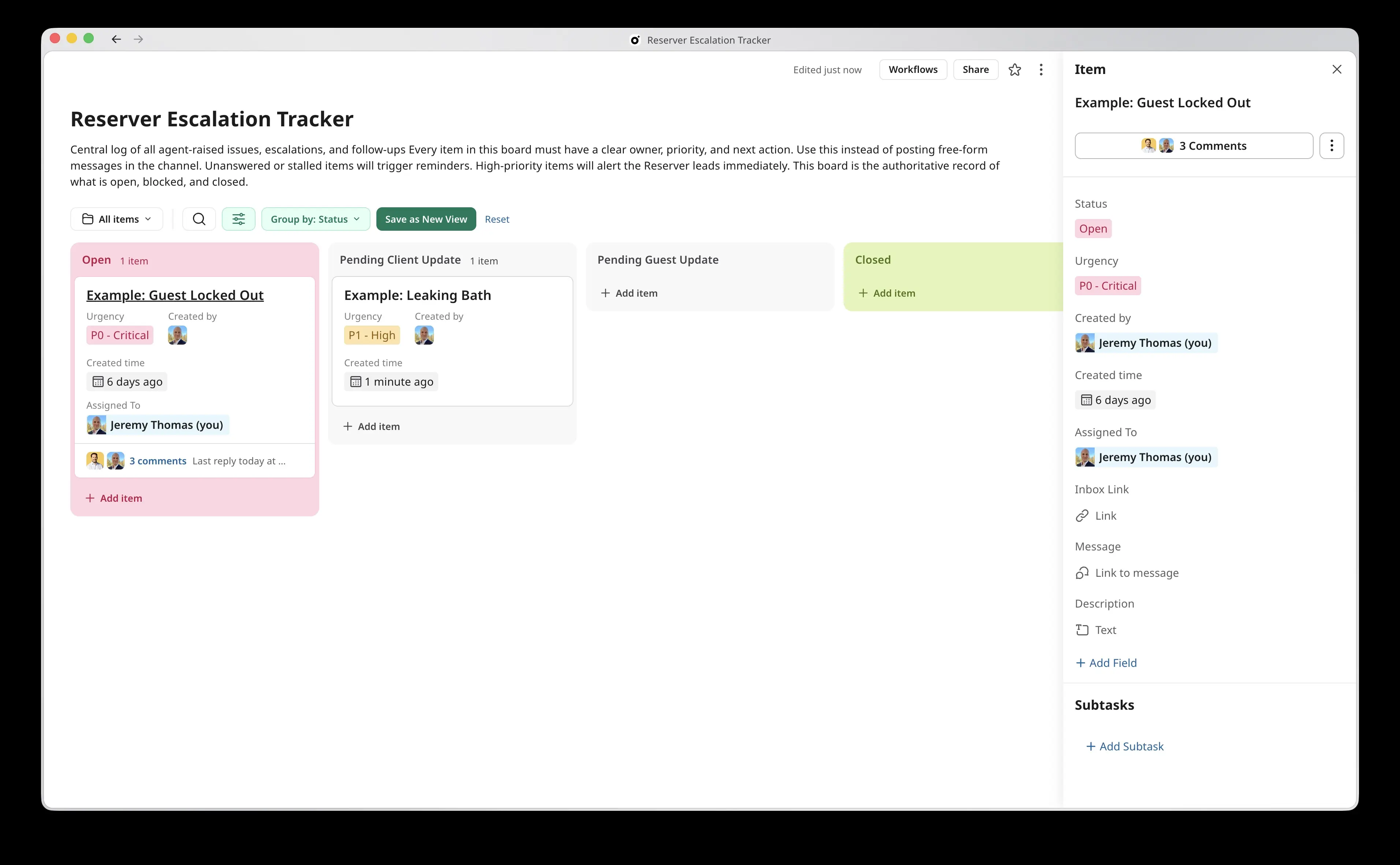
The issue will automatically appear in the Issue and Escalation Tracker tab.
Note that a P0 - Critical situation should always be addressed by calling the client. The ticket here is only to track evolution and response.
What happens after submission
- Each issue is assigned a priority and owner (if a shift change occurs, change the Assigned To field).
- Make sure you move the card to "Pending client"
- Set issues reminders and reminders for follow-ups
- Resolved issues are marked complete and archived
Make sure you also add an Internal Note in Guesty explaining the situation and resolution.
This creates a clear, shared record of what is open and what is resolved.
What not to do
• Do not post long escalation messages instead of logging an issue
• Do not DM the client team for tracked issues
• Do not assume silence means the issue is being handled
If it is not logged, it is not tracked.
Process Standard
This process is mandatory for all agents.
Any issue that requires follow up, action, or a decision must be logged using the Issue and Escalation Tracker in Slack. Messages alone are not sufficient.